How do you stop the a key/time signature change showing in the preceding bar?

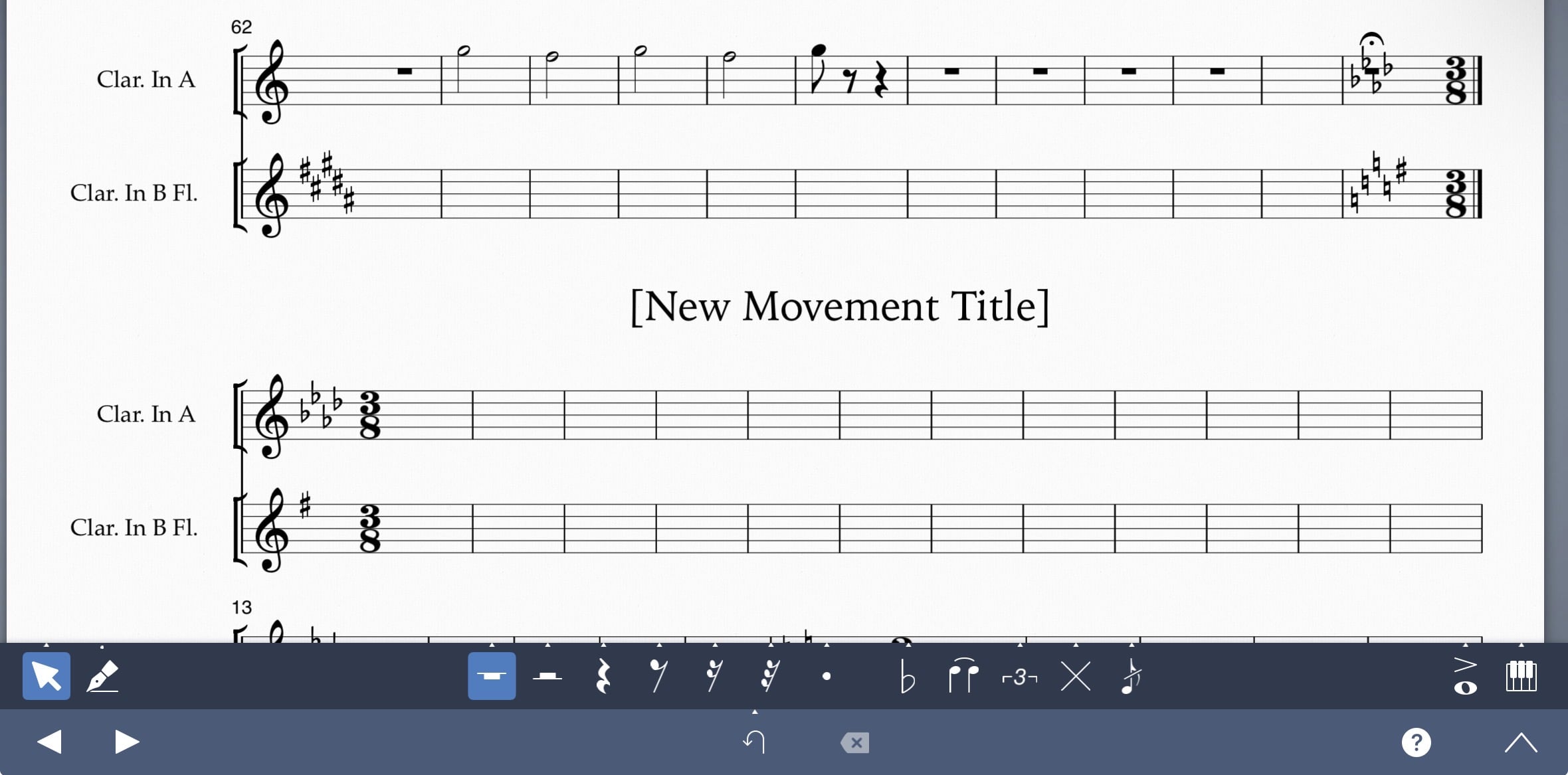
In my project, I’ve got 2 separate movements. I’ve set the key and time signature for the second movement and it’s showing in the final bar of the first movement. I was hoping by defining them as movements that they would be treated as completely independent, separate sections and not add preceding cautionary key/time signature changes in the movement before?
It’s also causing the final bar of my first movement to be squished (the bar rest is covered) and I can’t figure out how to rectify this either (if the issue I mentioned above can’t be fixed)
Sorry if this isn’t clear, I’ve attached a picture below:
It’s also causing the final bar of my first movement to be squished (the bar rest is covered) and I can’t figure out how to rectify this either (if the issue I mentioned above can’t be fixed)
Sorry if this isn’t clear, I’ve attached a picture below:
0
Comments
-
@SophieMaycroft
Sorry to hear about this, though your clear description of the issue is much appreciated. What you've described is definitely a bug with SP, and we'll be sure to fix it in one of the next updates this year.0
