Can’t change staff spacing, just immediately reverts

The app won’t let me change staff spacing. I finally figured out how to even do it, but it just immediately goes back to where it was. I don’t know if there is a setting somewhere that I need to change for it to let me do this?? I have turned off justified staff spacing already (tried with it on and off just in case). I really need to create more space, I have too many layered instruments.
0
Comments
-
@kohlrabi
Sorry about the issue. The following is a quick demo of how to most reliably adjust the vertical spacing between staves / staff systems.Please let us know if this is the edit you wanted to make, and if it still does not work as expected.
Specifically, in Select Mode:
1. Tap on the corner of a bar, which brings up a handle: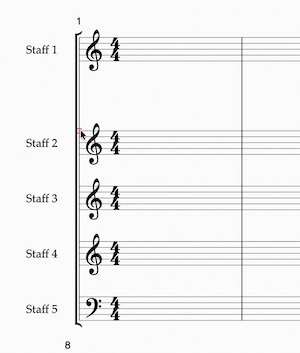
2. You can then drag the handle vertically to reposition, as demoed here.0 -
This is exactly what I have done and it moves and then immediately jumps back. I would attach a screen recording of this but it won’t let me attach a video. As soon as I let go of the staff it moves right back to where it was.0
-
I haven’t found a project of mine that is *not* affected. That is why I asked here about settings that might be preventing this from working. I would be fine with emailing the support email but do you really want me sending you all of my projects?0

 Please let us know if this is the edit you wanted to make, and if it still does not work as expected.